
Leadership development where you already work.
Adeption helps leaders navigate the complexity of their roles by turning daily challenges into opportunities for growth. By bringing these experiences into Slack, we help you bridge the gap between thinking about leadership and practicing it in the moment.
Guidance for the moment.
Leadership often requires navigating nuance in real time. In Slack, ask about a specific challenge – such as preparing for a difficult conversation or shifting team dynamics – and receive immediate suggestions.
- Contextual advice: Get personalized and fresh perspectives on ways to tackle your challenge.
- Evidence-based: Access insights drawn from proven research and the collective wisdom of other leaders.
- Immediate clarity: Move forward with actionable steps without leaving your conversation.
Workouts that fit your day.
Development should feel like a natural part of your workflow rather than an additional task. You can now progress through Adeption experiences directly within your Slack channels.
-
Stay in context; Complete reflections on your actions where your work is already happening.
-
Keep the rhythm: Integrated touchpoints make it easier to stay consistent with your development goals.
-
Focus on practice. Spend more time on the work of leading by removing the need to switch platforms.
How to install and use the Adeption app for Slack.
he Adeption app for Slack is a companion for current participants & coaches It provides a space to think through your approach and experiment with new behaviors throughout the workday.
To use these features, you will need an active Adeption profile. If your organization is already using Adeption, you can add the app to your workspace to begin. For teams new to the platform, you can reach out to us at hello@adeption.io to get started.

First, check the Adeption app for Slack is installed in your workspace.
Before proceeding, check if the Adeption app for Slack is installed in your workspace by accessing Apps in Slack.
Start installation.
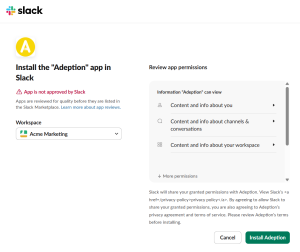
Start installing the Adeption app for Slack by clicking on this link.
Review permissions.
You will be directed to the Slack authentication flow, where you can review and grant the app the required permissions. Be sure to select the correct Workspace.
Depending on your workspace settings, this may require an approval from a Slack admin.
Start using Adeption app for Slack.
You may begin using the Adeption app for Slack. Enter a current challenge in the Messages tab.
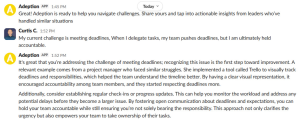
Disclaimer: AI-Generated Content: Output may be inaccurate or misleading. Always verify information. Not a substitute for professional advice.
Want to learn more about how we protect your information? Check out our Adeption Privacy Policy.
Need help? Contact us. We’re here to help!